
Tests
The Tests view is the dashboard’s landing page: every test’s state for the selected day (or range), summarized in status cards and listed in the tests table. The branch, environment, calendar, and FQL controls scope what you see.
Status cards
Section titled “Status cards”One card per status: Passed, Regressed, Failed, Flaked, Skipped. Each card shows the count and percentage of tests currently in that state, respecting the active FQL query.
The card block’s background color reflects the day’s aggregated status: green when everything is healthy, yellow when the number of flaked tests exceeds the acceptable flakiness rate, red when anything failed or regressed.
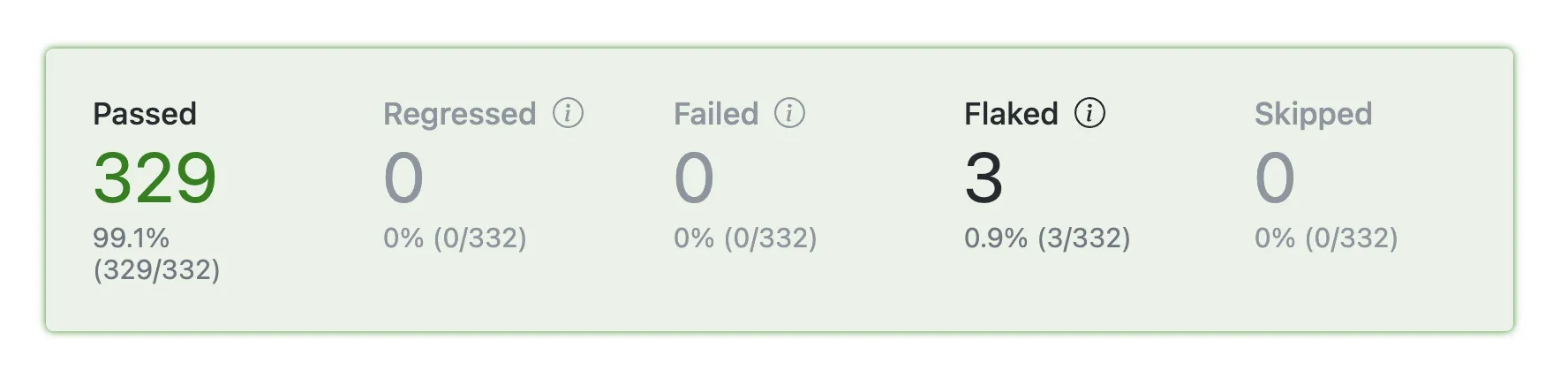
- Passed — tests whose last run of the day is passing.
- Regressed — tests with failing last run of the day that had perfect history before the selected day.
- Failed — tests with failing last run of the day, but had history with flakes or failures before selected day.
- Flaked — tests that flaked during their last run of the day.
- Skipped — tests that were skipped during their last run of the day.
Tests table
Section titled “Tests table”An overview of the filtered set, with one row per test × environment. The same test can appear on multiple rows if it ran in multiple environments — for example, on different operating systems, or, for browser end-to-end tests, in different browsers. Click any column header to sort.

- History — up to 10 bars of this test’s recent results. Depending on the history mode, a bar is a commit or a time period. The color of the bar is the test outcome; the height is the test’s duration relative to the other bars. Click a bar to open the test’s history at the commit that produced the bar’s outcome.
- Status — the test’s last status on the selected day.
- Test name — the full test title and its source location.
- Environment — the environment that produced this row.
- Duration — the test’s duration in its last run of the day, with retries added up.
- Duration Trend — difference between the oldest bar in the History column and the current duration.
- Flip Rate — how many times the status flipped across the bars in the History column. See Flip Rate.
Duration Trend and Flip Rate are history-based columns: they summarize the History column’s bars rather than just the selected day.
History modes
Section titled “History modes”The History column header has a dropdown that picks how results are grouped into bars:
- By commit — one bar per commit that ran the test. This is the default.
- By 3 hours, By day, By week — one bar per period in which the test ran. The bar shows the worst outcome the test had in that period, so a single failure colors the whole bar. Its duration comes from the test’s last result in the period. Periods follow the project timezone, and weeks start on Sunday.
Commits and periods in which the test didn’t run are skipped, so a rarely run test still gets up to 10 bars.
The dropdown changes the mode only for your current view. Project Editors set the default for everyone under Default History in the project settings.